Metal Replacement Joysticks compatible with DJI RC-N1 and RC-N2
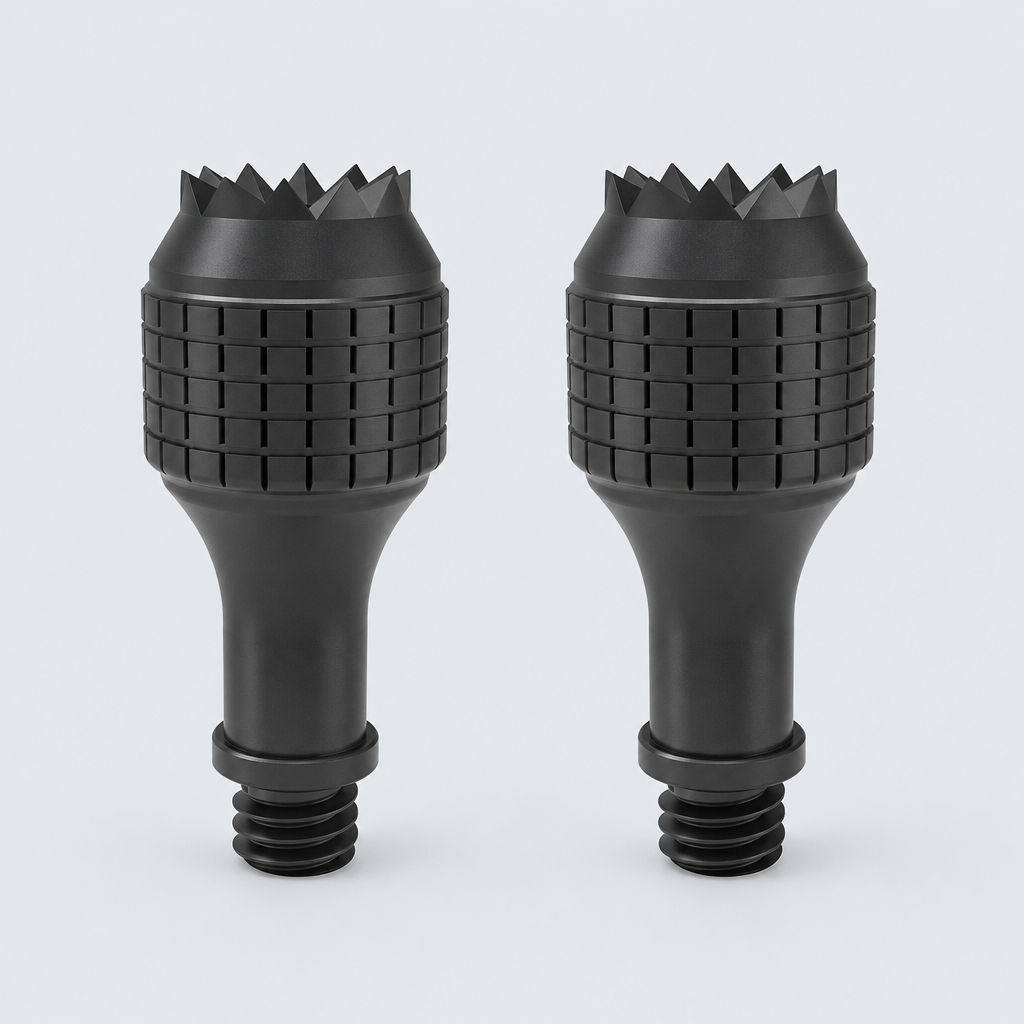
A pair of black aluminum alloy replacement joysticks for your remote controller. These metal thumb sticks provide a durable and precise control experience.
01Key facts
- Part type
- Joystick
- Category
- Game Controller Parts
- Part no. (MPN)
- Not published
- Pack
- 2-pack
- Verified models
- 3
- Brands covered
- 2
- Customer rating
- No reviews yet
- Type
- Aftermarket replacement
02Compatibility matrix
Only models verified by our team are listed| Brand | Model | Status | Parts for model |
|---|---|---|---|
| Lexus | Lexus RC | Verified | View → |
| Dji | DJI RC-N1 | Verified | View → |
| DJI RC-N2 | Verified | View → |
Only the models listed above have a confirmed catalog fit. If yours is absent, compatibility is unknown, not ruled out. Compare the exact model identifier and any published dimensions or connectors before ordering.
Where to find your model number
- Lexus: Use your 17-character VIN — it's on the driver-side dashboard at the base of the windshield and on the driver's door jamb sticker. The year is in the 10th character. Also check your registration or the owner's manual.
- Lexus RC — model-specific location not yet confirmed; use the brand guidance above.
- Dji: Usually on the rating label under or on the back of the device. Your owner's manual also lists the model number.
- DJI RC-N1 — model-specific location not yet confirmed; use the brand guidance above.
- DJI RC-N2 — model-specific location not yet confirmed; use the brand guidance above.
General manufacturer guidance — exact label position can vary by model.
03Specifications
Catalog-normalized- Material
- Metal
- Color
- Black
- Dimensions
- 2.2 cm x 0.8 cm
04Additional attributes
Reference data - not independently verified| Variant | Black-RC N1 N2 |
Attributes above are reference values from the supply chain. They are shown for comparison only and are not a verified measurement of this part.
05How to check this part
- Match the complete model name or number against the verified models above.
- Compare the part type, pack contents and any published specifications to the part you are replacing.
- Where a required dimension or connector is not published, contact us rather than treating missing information as a match.
06Supplier vs manufacturer cross-check
What the listing claims, compared with official manufacturer guidance| Topic | Supplier listing | Manufacturer guidance | Our check |
|---|---|---|---|
| Compatibility | Model list claimed in the listing | Match the model number on your device label | 3 models verified |
| Specifications | 4 attributes published | Compare with the original part listed in your device manual | Reference only, not measured by us |
| Installation | No official instructions supplied | Follow your device manufacturer's manual | Our guide below follows manufacturer guidance |
Where the supplier and the manufacturer differ, follow the manufacturer.
07Installation guide - General replacement guidance
General guidance for this part type - always follow your device manual- Basic hand tools only if your device manual requires them
- If anything does not fit without force, stop and recheck the model compatibility.
- Keep the old part until you have confirmed the new one works.
- 1Switch the device off and disconnect it from power before starting.
- 2Locate the part using your device manual - access panels and latches vary by model.
- 3Remove the old part and note its orientation and any connectors.
- 4Compare the old and new parts side by side before installing.
- 5Fit the new part in the same orientation, without forcing it.
- 6Reassemble, then run a short test to confirm normal operation.
This is general guidance for the part type, not a model-specific procedure. If the part does not fit without force, stop and recheck compatibility.
12-month warranty on every part
Every part we sell is covered for 12 months from delivery. If it fails in normal use, we replace it or refund you — claim it straight from your order page.
07Customer reviews
No reviews yet. Bought this part? Be the first to review it.
Questions & answers
Questions & answers
+What's in the box?
Pack size: 2-pack, as listed for this part. Check the photos and specifications for the exact contents.
+What is it made of?
Listed material: Metal.
+Which models has your team verified?
3 models are verified, see the compatibility table above.
+How do I install the joystick?
Follow the installation guide on this page together with your device's user manual. Always switch off and unplug the device first.
+How long does shipping take?
Free to the US, $4.99 to the other 15 countries we ship to. See Shipping & returns for the estimated window to your country.
+Is there a warranty?
Yes, every part comes with a 12-month warranty. You can file a claim from the order page in your account.
+How do I know the joystick fits my model?
Check the "Verified compatible with" list. Only models our team has confirmed appear there. If your model isn't listed, the fit hasn't been confirmed yet.
+Is this an original manufacturer (OEM) part?
No. Fitly Parts sells compatible aftermarket parts. Brand and model names are used only to describe compatibility.
+What if it doesn't fit?
Parts marked as compatible are covered by our fit guarantee - we'll replace it or refund you.
+Can I save my devices?
Yes. Add your models under My devices and every part that fits them gets a "Fits your…" badge across the store.
More in our fit guarantee, returns policy and shipping.