
10pcs Joystick Thumbsticks compatible with Microsoft Xbox 360
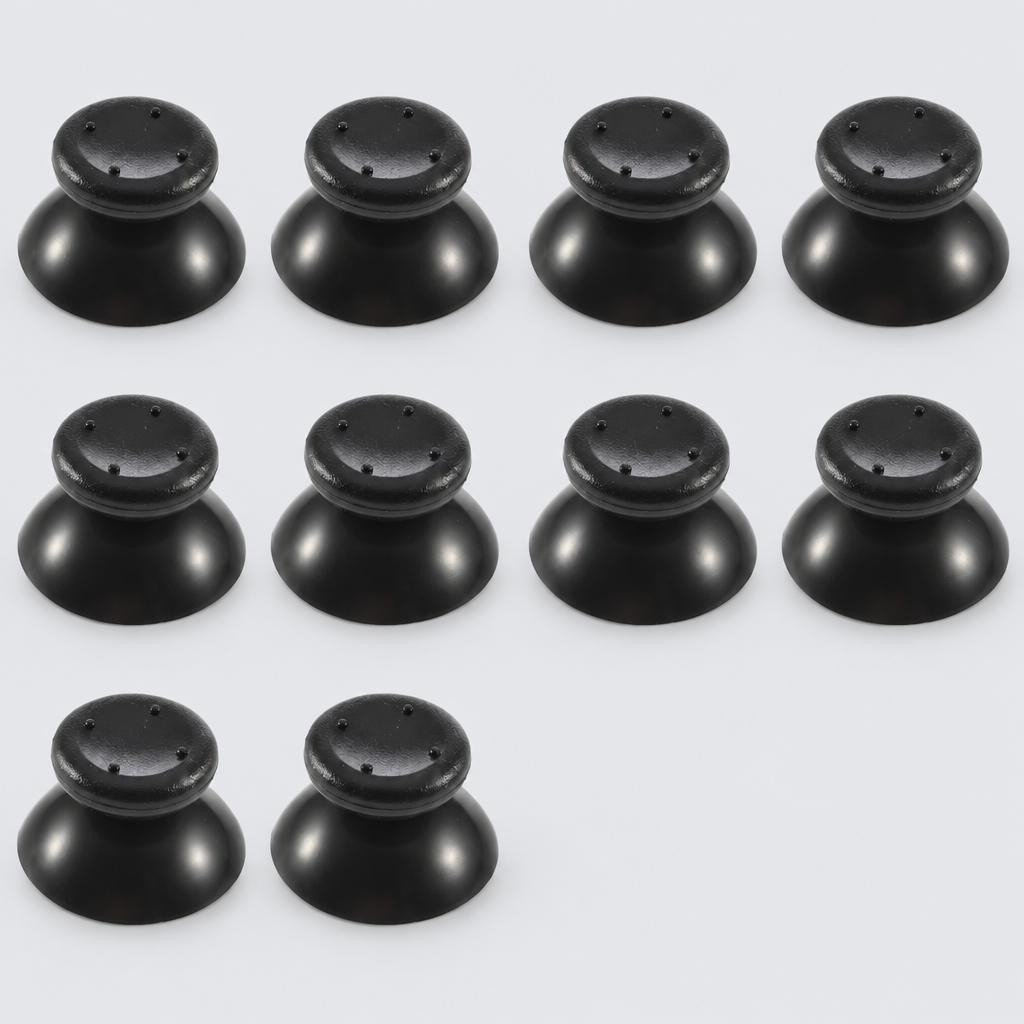
Refresh your controller with this 10-piece set of replacement analog joystick thumbsticks. Installation requires a T8 screwdriver to open the controller shell.
Key facts
- Part type
- Joystick Thumbsticks
- Included
- 10-pack
- Type
- Aftermarket replacement
Compatibility matrix
Only models verified by our team are listed| Parts for | Model | This part |
|---|---|---|
| Microsoft | Microsoft Xbox 360 | Fits |
Only the models listed above have a confirmed catalog fit. If yours is absent, compatibility is unknown, not ruled out. Compare the exact model identifier and any published dimensions or connectors before ordering.
Where to find your model number
- Microsoft: Usually on the rating label under or on the back of the device. Your owner's manual also lists the model number.
General manufacturer guidance: exact label position can vary by model.
Joystick Thumbsticks specifications
- Material
- Plastic/Rubber with Textured Grip
- Quantity
- 10 Pieces
- Installation
- Internal fitting required (T8 screwdriver needed)
- Application
- Analog stick repair/replacement
Installation guide - Replacing a thumbstick or joystick
General guidance for this part type - always follow your device manual- Tri-wing or Phillips screwdriver
- Plastic spudger
- Soldering iron and desoldering wick, for soldered joysticks only
- Hall effect joysticks can need calibration on first use; do this before closing if the controller allows it.
- 1Thumbstick caps only. Pull the old cap straight up firmly, line up the new cap with the stick's shaft and press it straight down until it is fully seated. You can stop here.
- 2Open the controller. For a full joystick, switch the controller off, remove its screws and release the clips along the grips. Disconnect the battery if it has a plug.
- 3Check how the joystick connects. Joy-Con style joysticks plug in with a ribbon and a small lock. PlayStation and Xbox joysticks are soldered to the board and need desoldering.
- 4Fit the new joystick. Seat the ribbon fully and close its lock, or solder each pin cleanly with no bridges between pins.
- 5Test and calibrate. Reassemble, then run the stick calibration in your console's settings and check for drift before regular play.
This is general guidance for the part type, not a model-specific procedure. If the part does not fit without force, stop and recheck compatibility.
Maintenance check
Signs it's time to replace
- 01Controller drifts without touching the stick
- 02Cap is worn, slippery or torn
- 03Stick feels loose or unresponsive
More parts for Microsoft Xbox 360
See all Microsoft Xbox 360 parts
12 month warranty on every part
Every part we sell is covered for 12 months from delivery. If it fails in normal use, we replace it or refund you , claim it straight from your order page.
Customer reviews
No reviews yet
Bought this part? Be the first to share how it fit and how it held up.
Questions & answers
+Which models does this joystick thumbsticks fit?
Our team verified it for Microsoft Xbox 360. The full list is in the compatibility table above.
+How do I make sure it fits my exact model?
Find the model number on your device label and compare it with the table above. Our fit guarantee covers verified models.
+What's in the box?
Pack size: 10-pack, as listed for this part. Check the photos and specifications for the exact contents.
+What is the joystick thumbsticks made of?
Listed material: Plastic/Rubber with Textured Grip.
+Is it hard to install?
Install difficulty: Advanced · mechanical experience needed. Step by step instructions are on this page.
+How fast will it arrive?
US orders arrive in 7 to 15 business days with free shipping. Other countries are shown at checkout.
+Is there a warranty?
Yes, a 12-month warranty is included, and you can extend it at checkout. Returns are accepted within 30 days.